Beginner10 min read
How to Conduct a Business Time Audit in 5 Days
A practical, day-by-day framework for mapping where your team's time actually goes — and identifying the highest-leverage automation opportunities.
Read guide →If you've been hearing about AI automation and wondering where to actually start, this guide is for you. Not a high-level overview of what's possible — a practical, step-by-step path from "I've never done this" to "I have a working automation."
AI automation in a business context means using software to handle tasks that previously required a human to do manually — things like responding to routine emails, moving data between systems, scheduling, generating first drafts of documents, or flagging items that need attention.
The "AI" part matters because it means the automation can handle variation. A basic automation might move every form submission into a spreadsheet. An AI-powered automation can read that form, understand what the person is asking, categorize it, and route it to the right person with a suggested response already drafted.
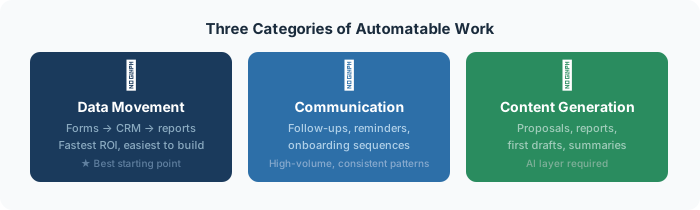
Data movement: Any task where information needs to get from one place to another — form submissions into a CRM, invoices into accounting software, meeting notes into a task manager. This is the simplest category and often delivers the fastest wins.
Communication: Follow-up emails, appointment reminders, status updates, onboarding sequences. These are high-volume, repetitive, and have consistent enough patterns that automation handles them reliably.
Content generation: First drafts of proposals, reports, social posts, email replies. AI doesn't replace your judgment on these, but it eliminates the blank-page problem and cuts production time by 60–80%.
The most common mistake beginners make is trying to automate multiple things at once. Pick one process. Ideally, pick one that:
Good first candidates: new lead follow-up, client onboarding emails, weekly report compilation, invoice generation, or social media scheduling.
You don't need to learn to code. Here's the starter stack:
Zapier or Make: Your automation backbone. These tools connect applications and move data between them when specific triggers happen. Start with Zapier if you're completely new — the interface is more beginner-friendly.
ChatGPT or Claude (via API): Your AI layer. When your automation needs to understand, summarize, classify, or generate text, you route it through an AI step. Both Zapier and Make have native AI integrations that require no coding.
Your existing CRM: Whatever you're already using for contacts — HubSpot, GoHighLevel, Salesforce, even a simple Airtable. The automation feeds into it; you don't need to change it.
Step 1 — Define the trigger: What event starts the process? (A form is submitted, an email arrives, a date is reached, a row is added to a spreadsheet.)
Step 2 — Define the action: What should happen as a result? (Send an email, create a record, add a task, generate a document.)
Step 3 — Map the data: What information from the trigger needs to be used in the action? (The contact's name in the email, the form details in the CRM record.)
Step 4 — Build and test: In Zapier or Make, connect your trigger app, add your action step, map the fields, and run a test with real data.
Step 5 — Turn it on and monitor: Run the automation live for a week. Check that every trigger fires correctly and every action completes as expected.
A successful first automation usually saves 2–5 hours per week. That's enough to prove the model works and build confidence to tackle the next one. By your third or fourth automation, you'll start seeing compound effects — time savings that stack and free up bandwidth for higher-value work.
The goal isn't to automate everything. It's to identify the highest-leverage processes and systematically remove yourself from the parts that don't require your unique judgment. Start with one. Build it right. Then expand.
Book a free audit and we'll map the exact automations right for your business.
Get free time audit →A practical, day-by-day framework for mapping where your team's time actually goes — and identifying the highest-leverage automation opportunities.
Read guide →A hands-on walkthrough for building a complete lead capture → CRM → follow-up email workflow using Zapier, without writing a single line of code.
Read guide →A curated, no-fluff guide to the 6 AI tools that consistently deliver the best ROI for small teams — what each one does, when to use it, and what to avoid.
Read guide →