Beginner12 min read
The Complete AI Automation Starter Guide
Everything you need to go from zero to your first running automation — no coding required. Covers the core concepts, the right tools, and a step-by-step launch checklist.
Read guide →Most businesses have a vague sense that "we spend too much time on admin." A time audit turns that vague feeling into specific numbers — and specific numbers make it easy to prioritize what to automate first.
This is a 5-day process you can run without any specialized tools or outside help.
Choose which part of the business you're auditing. Options:
Start narrow. A focused audit on one role or one process delivers more actionable output than a broad survey that stays superficial.
On Day 1, also create a simple tracking document — a spreadsheet with columns for: Task, Category (Admin / Client Work / Communication / Meetings / Content / Other), Time Spent (minutes), Frequency (daily/weekly/monthly), and Notes.
Ask every person in scope to log their time for two full days — not from memory, but in real time. Every task, every interruption, every "quick thing" that took 15 minutes.
Common categories to track:
The goal isn't to judge how time is being spent — it's to make invisible work visible.
Aggregate the logs and look for patterns. Specifically:
Volume: Which tasks appear most frequently? Frequency × time per occurrence = total weekly cost. A 10-minute task done 20 times a week is 3+ hours.
Variability: Which tasks have consistent inputs and outputs every time? Low variability = high automation potential. High variability = better for AI-assisted work rather than full automation.
Value: Which tasks require human judgment, relationship, or expertise? Which could be handled by software? Don't automate high-judgment work just because it's time-consuming.
Create a 2×2 matrix: Time Cost (high/low) vs. Automation Potential (high/low). Your first automation candidates are the high-time, high-potential quadrant.
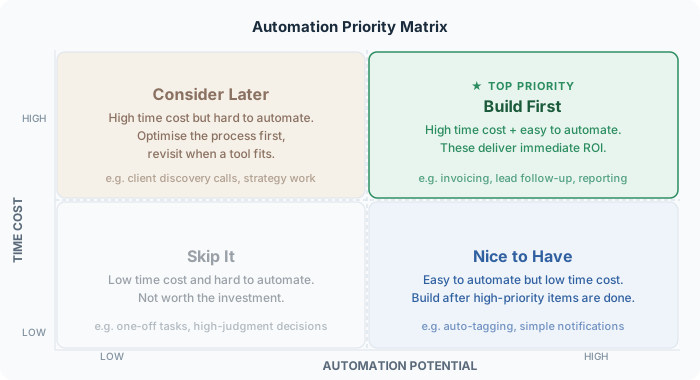
For each high-priority item, document:
Sort by estimated ROI. The top 3 items on this list become your 90-day automation roadmap.
Most service businesses discover that 30–50% of the time logged is genuinely automatable. A 10-person team typically finds 40–60 hours per week of work that could be handled by software — the equivalent of 1–1.5 full-time employees.
The audit doesn't tell you what to build. It tells you what to build first — which is the question most businesses answer wrong by defaulting to the shiniest tool rather than the highest-leverage problem.
Book a free audit and we'll map the exact automations right for your business.
Get free time audit →Everything you need to go from zero to your first running automation — no coding required. Covers the core concepts, the right tools, and a step-by-step launch checklist.
Read guide →A hands-on walkthrough for building a complete lead capture → CRM → follow-up email workflow using Zapier, without writing a single line of code.
Read guide →A curated, no-fluff guide to the 6 AI tools that consistently deliver the best ROI for small teams — what each one does, when to use it, and what to avoid.
Read guide →