Beginner12 min read
The Complete AI Automation Starter Guide
Everything you need to go from zero to your first running automation — no coding required. Covers the core concepts, the right tools, and a step-by-step launch checklist.
Read guide →This guide walks through building a complete, production-ready automation workflow from scratch. By the end, you'll have a system that captures new leads, logs them in your CRM, and sends a personalized follow-up email — all automatically, within minutes of the lead submitting a form.
Trigger: A new lead submits a contact form on your website.
Step 1: A contact record is created in your CRM with all form details.
Step 2: A personalized follow-up email is sent to the lead within 5 minutes.
Step 3: A task is created for your team to follow up within 24 hours.
This three-step sequence handles the most time-sensitive part of lead management automatically and ensures nothing falls through the cracks.
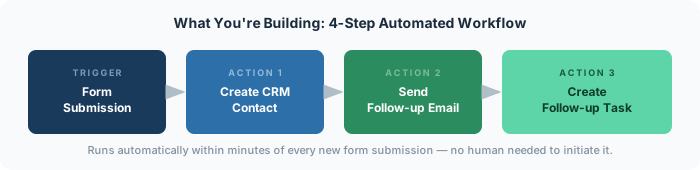
In Zapier, every automation (called a "Zap") starts with a trigger — an event that kicks the whole sequence off.
At this point you should see all your form fields mapped in Zapier: first name, last name, email, phone, message, etc. These become the building blocks for every subsequent step.
A common addition here: if your CRM supports it, also set the lead source field to the form name or URL. This gives you clean attribution data later.
The key to a good automated follow-up email is that it shouldn't feel automated. Address them by first name, reference what they submitted (if possible), and give them a clear next step — a link to book a call, a resource to review, or a simple question to answer.
Before turning on the Zap, test the full sequence end-to-end:
Once everything looks good, turn the Zap on. From that moment, every new form submission triggers the full sequence automatically.
This workflow handles the initial capture and follow-up. Natural extensions:
The foundation you've built here is reusable — the same pattern (trigger → CRM → email → task) works for client onboarding, event registration, application submissions, and dozens of other scenarios.
Book a free audit and we'll map the exact automations right for your business.
Get free time audit →Everything you need to go from zero to your first running automation — no coding required. Covers the core concepts, the right tools, and a step-by-step launch checklist.
Read guide →A practical, day-by-day framework for mapping where your team's time actually goes — and identifying the highest-leverage automation opportunities.
Read guide →A curated, no-fluff guide to the 6 AI tools that consistently deliver the best ROI for small teams — what each one does, when to use it, and what to avoid.
Read guide →