Beginner12 min read
The Complete AI Automation Starter Guide
Everything you need to go from zero to your first running automation — no coding required. Covers the core concepts, the right tools, and a step-by-step launch checklist.
Read guide →The AI tools landscape is overwhelming. There are thousands of tools, new ones launching weekly, and no shortage of people telling you each one is essential. This guide cuts through all of that and focuses on six tools that consistently deliver measurable ROI for small service businesses — regardless of industry.
Every tool here meets three criteria: it saves time on a task you already do regularly, it doesn't require technical skills to use effectively, and it has a clear, measurable outcome. These aren't aspirational tools — they're workhorses that earn their place in your workflow.
What it does: Generates, edits, and refines text — proposals, emails, reports, social posts, SOPs, and anything else that requires writing.
Best use cases: First drafts of client-facing documents, turning bullet points into polished emails, summarizing long documents or call transcripts, creating templates from scratch.
What to avoid: Treating its output as final without review. AI-generated content needs your context and judgment before it goes to a client.
Time saved per week: 3–6 hours for anyone who writes regularly.
What it does: Connects your existing apps and automates data movement between them when specific events happen.
Best use cases: New lead → CRM entry → follow-up email, form submission → task creation, invoice sent → payment tracking.
What to avoid: Building complex multi-step Zaps before you've mastered simple two-step ones. Start with "when X happens, do Y" before adding AI steps or conditional logic.
Time saved per week: 4–8 hours for most service businesses after the first three automations are live.
What it does: Combines a structured workspace (for SOPs, client records, project tracking) with AI that can search, summarize, and generate content within your documents.
Best use cases: Building and maintaining an internal knowledge base, creating meeting summaries, drafting SOPs, and giving your team a single source of truth for how your business operates.
What to avoid: Over-engineering the structure before you've built the content. Start with a few core pages and let the system grow naturally.
Time saved per week: 2–4 hours on document hunting and meeting follow-up.
What it does: Lets clients and prospects self-schedule meetings based on your real-time availability, eliminating back-and-forth email coordination.
Best use cases: Discovery calls, consultations, onboarding meetings, or any recurring meeting type where you're currently coordinating via email.
What to avoid: Sending raw Calendly links without context. Embed them naturally in emails or on your website with a clear explanation of what the meeting is for.
Time saved per week: 2–3 hours of email coordination for most client-facing businesses.
What it does: Records short screen-share videos that you can send instead of writing long explanatory emails or scheduling unnecessary meetings.
Best use cases: Explaining complex feedback on client work, onboarding new team members, giving a tour of a deliverable, or walking through a proposal.
What to avoid: Recording videos longer than 5 minutes. If it takes more than 5 minutes to explain, you probably need a meeting — or the explanation needs restructuring.
Time saved per week: 2–4 hours of meetings that didn't need to happen.
What it does: Manages your contacts, tracks your pipeline, and runs automated follow-up sequences — all in one place.
Best use cases: Lead tracking from first contact to signed contract, automated nurture sequences, appointment reminders, client onboarding.
What to avoid: Choosing based on features alone. Choose based on what your team will actually use consistently. A simple CRM used well beats a powerful one that's always behind.
Time saved per week: 3–5 hours of manual follow-up and data entry.
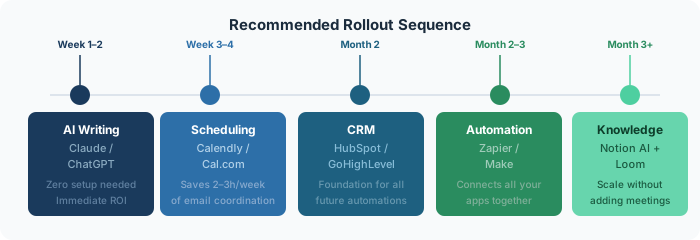
Don't implement all six at once. A phased approach works best:
Each tool compounds the others. Zapier is more powerful when your CRM is properly set up. Notion is more useful when your team is already meeting regularly. Build the foundation first, then layer on the complexity.
Book a free audit and we'll map the exact automations right for your business.
Get free time audit →Everything you need to go from zero to your first running automation — no coding required. Covers the core concepts, the right tools, and a step-by-step launch checklist.
Read guide →A practical, day-by-day framework for mapping where your team's time actually goes — and identifying the highest-leverage automation opportunities.
Read guide →A hands-on walkthrough for building a complete lead capture → CRM → follow-up email workflow using Zapier, without writing a single line of code.
Read guide →