Beginner12 min read
The Complete AI Automation Starter Guide
Everything you need to go from zero to your first running automation — no coding required. Covers the core concepts, the right tools, and a step-by-step launch checklist.
Read guide →Before you spend time and money building an automation, you should know whether it's worth building. This guide gives you a straightforward framework to estimate ROI on any automation project before you start — and helps you prioritize the ones that deliver the most value per hour invested.
1. Current time cost
How many minutes or hours does this task take per occurrence? Multiply by how often it occurs per week. This gives you the weekly time cost.
Example: writing client reports takes 2.5 hours per client, you have 8 clients, and reports go out monthly. Weekly time cost = (2.5 × 8) ÷ 4 = 5 hours/week.
2. Hourly cost of that time
Who does this task? Use their effective hourly rate (salary ÷ 2,000 for annual, or contract rate). For owner time, use what an hour of your time is worth to the business — typically your effective hourly billing rate.
3. Post-automation time
After the automation is running, how many minutes per occurrence still require human involvement? (Setup, review, exception handling.) This is rarely zero — most automations still need occasional oversight.
4. Build cost
How long will it take to build and test the automation? For a simple Zapier workflow: 2–4 hours. For a complex multi-step workflow with AI: 8–20 hours. For a custom integration: cost this out with whoever is building it.
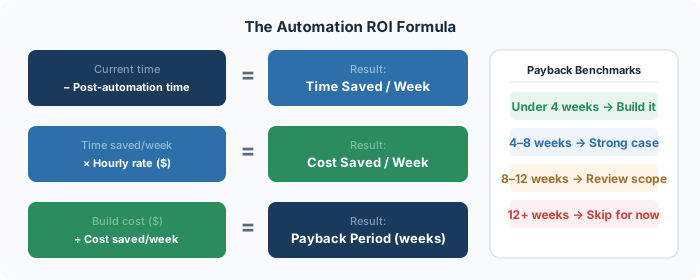
Weekly time saved = Current time cost − Post-automation time
Weekly cost saved = Weekly time saved × Hourly rate
Payback period = Build cost ÷ Weekly cost saved
Any automation with a payback period under 4 weeks is an easy yes. Under 8 weeks is still strong. Over 12 weeks deserves a harder look at whether the estimate is right or whether there's a higher-leverage alternative.
Task: Monthly invoice generation and sending
Current time: 45 minutes per client × 12 clients = 9 hours/month = 2.25 hours/week
Hourly rate: $75/hour (admin staff)
Post-automation time: 5 minutes/month per client for review = 1 hour/month = 0.25 hours/week
Build cost: 6 hours (setting up invoicing software + Zapier integration)
Weekly time saved: 2.25 − 0.25 = 2 hours/week
Weekly cost saved: 2 × $75 = $150/week
Build cost in hours: 6 hours × $75 = $450
Payback period: $450 ÷ $150 = 3 weeks
3-week payback on an automation that then runs indefinitely is an obvious win.
Error rate of the manual process: If the current process generates errors that take time to fix, factor in the error correction cost. Automations are more consistent than humans on repetitive tasks — add this as additional savings.
Speed improvement: If the automation makes a process happen in minutes instead of hours (like lead response time), there may be revenue impact beyond the time savings. A lead that gets a response in 5 minutes vs. 5 hours has a significantly higher conversion probability.
Scalability: An automation that handles 10 clients the same way it handles 2 has compounding value as you grow. Factor in the projected time cost at 2× your current volume.
Maintenance burden: Some automations break when upstream tools update their APIs or change their data structure. Estimate an average of 1–2 hours per month for monitoring and occasional fixes on complex automations.
Run this calculation for every automation you're considering and sort by payback period. Build the shortest-payback items first — they free up time and budget to tackle the more complex (but potentially higher-value) ones later.
A common pattern: businesses that do this exercise for the first time identify 5–10 automations with sub-4-week payback periods. Building those in sequence — one every 2–3 weeks — delivers compounding ROI that becomes self-funding within a quarter.
Book a free audit and we'll map the exact automations right for your business.
Get free time audit →Everything you need to go from zero to your first running automation — no coding required. Covers the core concepts, the right tools, and a step-by-step launch checklist.
Read guide →A practical, day-by-day framework for mapping where your team's time actually goes — and identifying the highest-leverage automation opportunities.
Read guide →A hands-on walkthrough for building a complete lead capture → CRM → follow-up email workflow using Zapier, without writing a single line of code.
Read guide →